2 posts tagged with "java"

View All Tags

Anonymous Classes

· 2 min read
Axel Berlot
Java developer @ Opendev Pro

banner

sandbox.molokotech.com are powered by the Molokotech.

Las clases anónimas son sólo objetos que se instancian en función a una interface, una clase abstracta o una clase concreta que permite definir una clase conreta dentro de una instancia y sólo dentro de la misma, de esta forma no es necesario crear toda una clase nueva para un comportamiento custom.

Ejemplo

  • Abajo una clase anónima en función de Car que retorna un String
  • Debajo una clase que hereda la clase Car.
import java.time.LocalDateTime;

public class CustomCar {
public static void main(String[] args) {
// We define a custom class from another one that only going to live inside myCustomCar
String messageFromCustomCar = new Car() {

// Custom attribute
String brand = "Chevrolet";

// This method is useless but it is needed to override
@Override
void startedTime() {
System.out.println("started ON second: " + LocalDateTime.now().getSecond());
}

// Custom method
String getMessage() {
return "Do you like my " + brand + " custom Car?";
}

}.getMessage();

// We only print getMessage()
System.out.println(messageFromCustomCar);

}
}

// Classic extension
class Peugeot extends Car {
@Override
void startedTime() {
System.out.println("Started ON pretty fast");
}
}

// Could be an Interface, a concrete class or an abstract class
abstract class Car {
abstract void startedTime();
}

Cuándo y dónde utilizarla

  1. Utilizar una definición en un punto en particular para no tener que definir toda una clase completa para evitar tener clases definidas que no vas a reutilizar.
  2. Tener exactamente la implementación justo donde se use por ejemplo en aquellos parámetros que son interfaces.
  3. Acceder a miembros de la clase que existen en la clase custom.

public class CustomCar {

public static void main(String[] args) {
// In this case Runnable is an Interface
new Thread(new Runnable() {
@Override
public void run() {
System.out.println("Just in the exact place");
}
});
}

}

tip

Hoy en día se utilizan menos las clases anónimas ya que aprarecieron las expresiones lambda, sin embargo las mismas tienen la desventaja que sólo pueden ser definidas si:

  1. De donde se crean es una interface.
  2. Si sólo tiene un método abstracto que no sea los que vienen de la clase Object.
Data Types

· 5 min read
Axel Berlot
Java developer @ Opendev Pro

banner

sandbox.molokotech.com are powered by the Molokotech.

Java has an strong dependency with data types, it is important to understand how they works and how to use it.

Have you ever tougth why there are so many data types from different sizes? it's really easy to explain, just because when Java was created sitting on 1995 and years later, the devices were Java could installed were pretty small in memory, so the aproach to used only data types that reserves less memory was important.

Today no one is concerned by this because your phone today is faster and bigger about memory speaking than your computers.

Today it's not a problem if you choose to use a byte or an int because it does'nt have side effects on the devices.

Data Types in Java.

package com.molokotech.models;

public class DataTypes {
private int num = 1; // Integer wrapper Class
private boolean isBigger = true; // Boolean wrapper Class
private char ch = 'j'; // Character wrapper Class
private float f = 100; // Float wrapper Class cast needed 100f/100F
private long l = 5000; // Long wrapper Class cast needed 5000l/5000L
private short sh = 1234; // Short wrapper Class
private byte b = 0; // Byte wrapper Class

// private vars can access to methods from the same class
private void getDataType() {
System.out.println("primitive type " + this.num + " in Java is the default for all non decimal numbers");
System.out.println("primitive type " + this.isBigger + " default value is false");
System.out.println("primitive type " + this.ch + " should be rounded by simple quotes default value 0 or u0000, character/letter");
System.out.println("primitive type " + this.f + " it's used by default like int default value 0.0");
System.out.println("primitive type " + this.l);
System.out.println("primitive type " + this.sh);
System.out.println("primitive type " + this.b + " values from -128/127");
}

// getDataType() should be called only from this class
public static void main(String[] args) {
new DataTypes().getDataType();
}
}

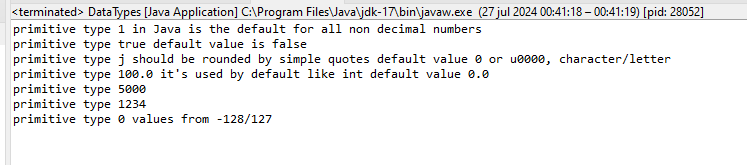
result

Wrapper classes Float and Long shoud be casted when declared until it reference another variable, in this momment compile apply autoboxing strategy.

package com.molokotech.models;

public class Cast {

private float f = 100; // Float wrapper Class cast needed 100f/100F
private long l = 5000; // Long wrapper Class cast needed 5000l/5000L

private void doCast() {
Float sh = 123f; // must be casted -> Float sh = 123; not compile!!
Float shRef = this.f; // Autoboxing when ref another variable not casting needed

Long l = 123l; // must be casted -> Long l = 123; not compile!!
Long lref = this.l; // Autoboxing when ref another variable not casting needed
}

}

There three rules:

  1. Every number data-types non-decimal is treated as an int always unless it is explicitly cast.
  2. Every number data-types decimal es treated as an double always unless it is explicitly cast.
  3. Cannot do reference from a smaller data-type to a bigger data-type, because it does'nt fit, unless it is casted, in that case the value will try to fit passing maximun values.

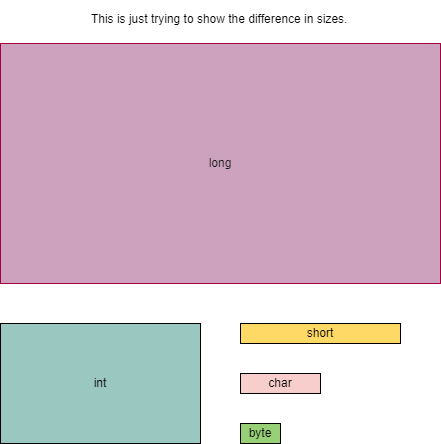
The next image it's not absolute and is just note the different sizes between data types in a graphical way.

result

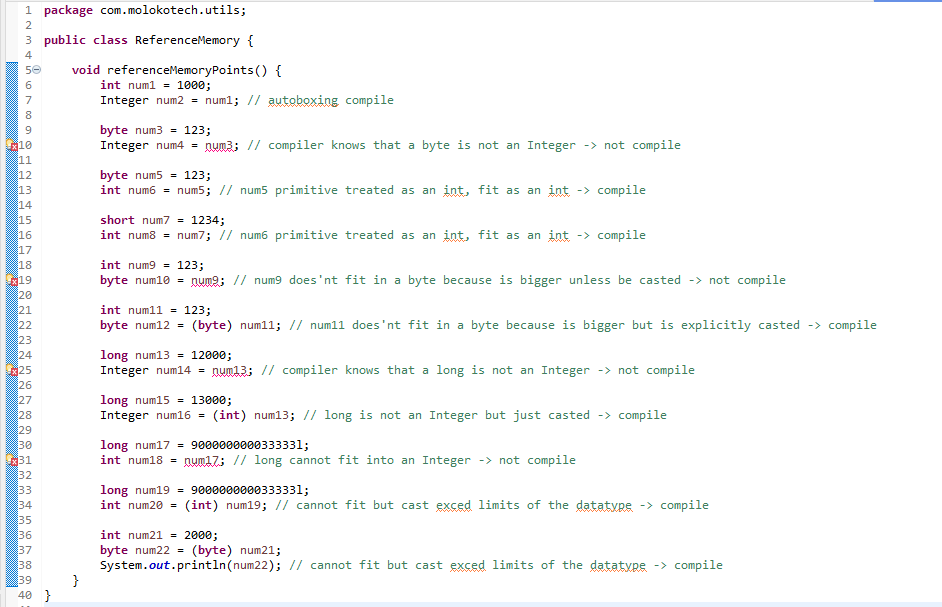
This code has some COMPILATION PROBLEMS related to bigger data-types trying to fit in smaller or incompatible data-types and other valid code you should copy into your IDE and make an analize it.


package com.molokotech.utils;

public class ReferenceMemory {

void referenceMemoryPoints() {
int num1 = 1000;
Integer num2 = num1; // autoboxing compile

byte num3 = 123;
Integer num4 = num3; // compiler knows that a byte is not an Integer -> not compile

byte num5 = 123;
int num6 = num5; // num5 primitive treated as an int, fit as an int -> compile

short num7 = 1234;
int num8 = num7; // num6 primitive treated as an int, fit as an int -> compile

int num9 = 123;
byte num10 = num9; // num9 does'nt fit in a byte because is bigger unless be casted -> not compile

int num11 = 123;
byte num12 = (byte) num11; // num11 does'nt fit in a byte because is bigger but is explicitly casted -> compile

long num13 = 12000;
Integer num14 = num13; // compiler knows that a long is not an Integer -> not compile

long num15 = 13000;
Integer num16 = (int) num13; // long is not an Integer but just casted -> compile

long num17 = 900000000033333l;
int num18 = num17; // long cannot fit into an Integer -> not compile

long num19 = 900000000033333l;
int num20 = (int) num19; // cannot fit but cast exced limits of the datatype -> compile

int num21 = 2000;
byte num22 = (byte) num21;
System.out.println(num22); // cannot fit but cast exced limits of the datatype -> compile
}

}

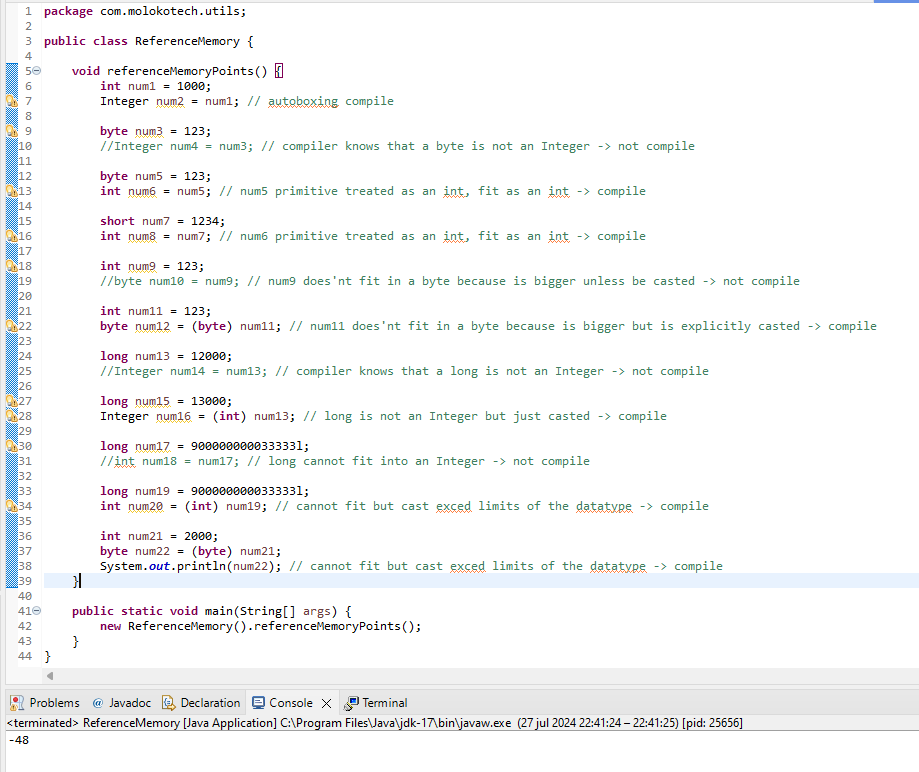
Viewing the results in the IDE

result

If we comment the compilation problems and run the program we see that prints a negative number even if we assign a positive number, this is because it reach out the max size of data-type and force it to assign with the cast, so it tries to fit anyway passing the limits.

max